|
|
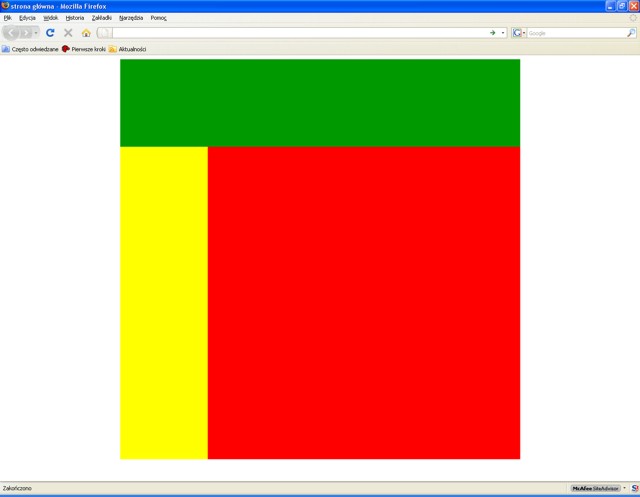
HTML - szablon strony głównej - zastosowanie tabeli <table></table>Kopiujemy kod poniżej, wklejamy do Notatnika (lub innego edytora tekstu), zapisujemy z nazwą index.html Okno wyboru formatu pliku przełączamy na Wszystkie pliki.<!DOCTYPE html> <html lang="pl"> <head> <meta charset="utf-8"> <title>strona główna</title> <meta name="keywords" content="słowa kluczowe"> <meta name="description" content="opis zawartości strony"> <meta name="author" content="imię i nazwisko autora, adres email"> <!--<link rel="stylesheet" type="text/css" href="styl.css">--> </head> <body> <div style="text-align:center; width:800px; margin-left:auto; margin-right:auto;"> <table border="0" cellspacing="0" cellpadding="0"> <tr style="background-color:#009900"> <td height="175" colspan="2"> </td> </tr> <tr> <td width="175" height="625" style="background-color:#ffff00"> </td> <td width="625" height="625" style="background-color:#ff0000"> </td> </tr> </table> </div> </body> </html> Otrzymujemy następujący efekt:
HTML - szablon strony głównej - zastosowanie znaczników <div></div>
<!DOCTYPE html>
<html lang="pl">
<head>
<meta charset="utf-8">
<title>strona główna</title><meta name="keywords" content="słowa kluczowe">
<meta name="description" content="Opis zawartości strony.">
<meta name="author" content="Imię i nazwisko autora, adres email">
<!--<link rel="stylesheet" type="text/css" href="styl.css">-->
<style type="text/css">
body {
text-align:center;
background-color:#FFFFFF;
}
#frame {
width:800px;
margin-right:auto;
margin-left:auto;
text-align:left;
}
#contentheader {
height: 175px;
background-color:#009900;
}
#contentleft {
width:175px;
height: 625px;
float:left;
background-color:#FFFF00;
}
#contentcenter {
width:625px;
height: 625px;
float:left;
background-color:#FF0000;
}
</style>
</head>
<body>
<div id="frame">
<div id="contentheader">
<div> </div>
</div>
<div id="contentleft">
<div> </div>
</div>
<div id="contentcenter">
<div> </div>
</div>
</div>
</body>
</html>
Otrzymujemy następujący efekt:
Tekst + zdjęcie (z lewej)<p> <img src="plaza.jpg" alt="plaża" width="300" height="225" style="float:left;margin:10px;"> Kąty Rybackie - wieś w Polsce położona w województwie pomorskim, w powiecie nowodworskim, w gminie Sztutowo na obszarze Żuław Wiślanych przy drodze wojewódzkiej nr 501. Wieś jest siedzibą sołectwa, w którego skład wchodzi również miejscowość Skowronki. W latach 1975-1998 miejscowość administracyjnie należała do województwa elbląskiego. Kąty Rybackie znajdują się na terenie Mierzei Wiślanej na zachodnim brzegu Zalewu Wiślanego, w odległości 56 km od Gdańska, a 17 km od Krynicy Morskiej. Jest to wieś rybacka z portem morskim i przystanią. Znajdują się tam szerokie, piaszczyste plaże oraz rezerwat przyrody kormorana czarnego. Rezerwat stanowi największą w Europie ostoję kormoranów. Zarówno sam rezerwat, jak i atrakcyjne miejsce położenia nad Zalewem Wiślanym dał podstawy do rozbudowania tu pokaźnej infrastruktury turystycznej i uczynienia z miejscowości popularnego ośrodka turystyczno-wypoczynkowego. Jest to również miejsce wycieczek młodzieży i nauczycieli VIII LO w Gdańsku. </p> Otrzymujemy następujący efekt:
Tekst + zdjęcie (z prawej)<p> <img src="plaza.jpg" alt="plaża" width="300" height="225" style="float:right;margin:10px;"> Kąty Rybackie - wieś w Polsce położona w województwie pomorskim, w powiecie nowodworskim, w gminie Sztutowo na obszarze Żuław Wiślanych przy drodze wojewódzkiej nr 501. Wieś jest siedzibą sołectwa, w którego skład wchodzi również miejscowość Skowronki. W latach 1975-1998 miejscowość administracyjnie należała do województwa elblskiego. Kąty Rybackie znajdują się na terenie Mierzei Wiślanej na zachodnim brzegu Zalewu Wiślanego, w odległości 56 km od Gdańska, a 17 km od Krynicy Morskiej. Jest to wieś rybacka z portem morskim i przystanią. Znajdują się tam szerokie, piaszczyste plaże oraz rezerwat przyrody kormorana czarnego. Rezerwat stanowi największą w Europie ostoję kormoranów. Zarówno sam rezerwat, jak i atrakcyjne miejsce położenia nad Zalewem Wiślanym dał podstawy do rozbudowania tu pokaźnej infrastruktury turystycznej i uczynienia z miejscowości popularnego ośrodka turystyczno-wypoczynkowego. Jest to również miejsce wycieczek młodzieży i nauczycieli VIII LO w Gdańsku. </p> Otrzymujemy następujący efekt:
Hiperłącza - znacznik <a></a><a href="https://klockowski.edu.pl/">Jacek Klockowski</a><br> <a href="https://klockowski.edu.pl/python_maturalny/index.html">Python - wprowadzenie</a><br> <a href="https://klockowski.edu.pl/html_i_css/index.html#galeria">Galeria</a><br> <a href="https://klockowski.edu.pl/stolik/index.html">Stolik do kawy Pana Klockowskiego</a><br> <style>
a:link{color:white; font-family:Courier; text-decoration:none; font-size:14pt}
a:visited{color:white; font-family:Courier; text-decoration:none; font-size:14pt}
a:hover{color:red; font-family:Courier; text-decoration:underline; font-size:14pt}
</style>
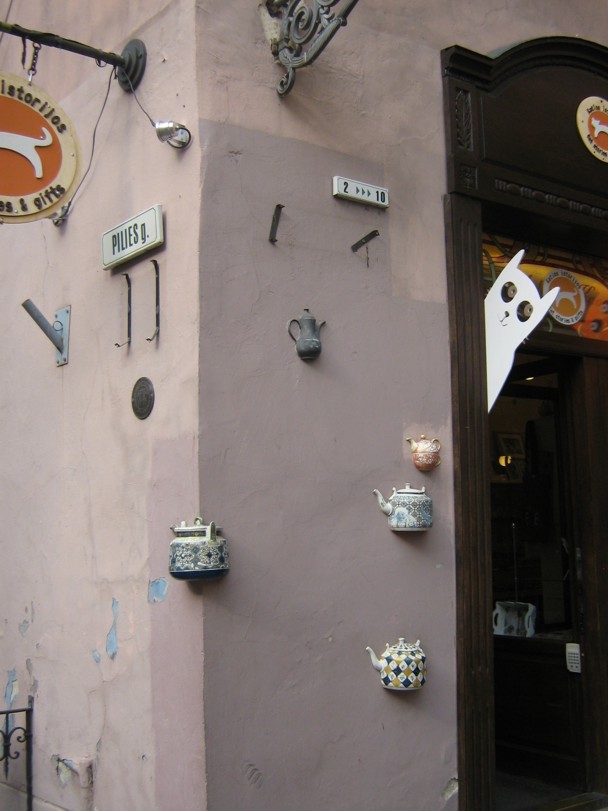
Otrzymujemy następujący efekt:Zdjęcia - efekty transition i transform - CSS3Transition, scale, transform-origin, hover - przy pomocy CSS można dodać efektowne animacje. Po najechaniu kursorem na zdjęcia - hover, przy pomocy scale(x,y) zdjęcie powiększa się w skali x i w skali y odpowiednio w prawo-lewo i górę-dół; w czasie określonym przez transition i względem punktu określonego przez transform-origin.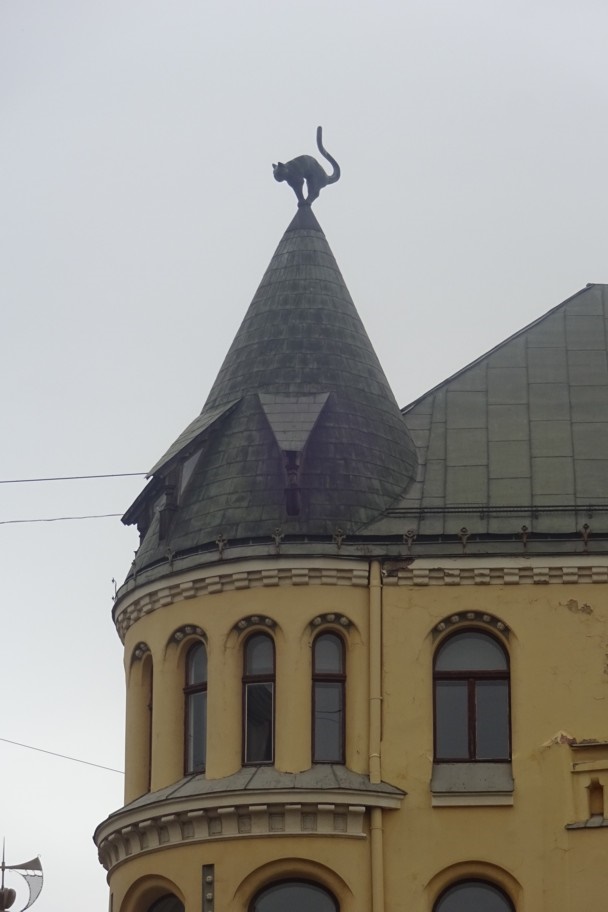
<!DOCTYPE html>
<html lang="pl">
<head>
    <meta charset="utf-8">
    <title>Galeria</title>
    <meta name="keywords" content="szablon galerii html">
    <meta name="description" content="Prosta galeria zdjęć">
    <meta name="author" content="Imię i nazwisko autora">
    <style>
        body {
            background-color: #FFFFFF;
            text-align: center;
        }
        * {
            box-sizing: border-box;
        }
        #page {
            max-width: 800px;
            margin: 0 auto;
            text-align: left;
        }
        #contentheader {
            background-color: #009900;
            height: 195px;
            padding: 10px;
            margin-bottom: 10px;
            display: flex;
            align-items: center;
            justify-content: center;
        }
        .gallery {
            display: flex;
            gap: 10px;
        }
        .zoom {
            flex: 1;
            overflow: hidden;
            aspect-ratio: 2 / 3;
        }
        .zoom img {
            width: 100%;
            height: 100%;
            object-fit: cover;
            transition: transform 0.85s;
        }
        .foto_lewy {
            transform-origin: 25% 10%;
        }
        .foto_prawy {
            transform-origin: 100% 15%;
        }
        .foto_lewy:hover {
            transform: scale(1.6, 1.35);
        }
        .foto_prawy:hover {
            transform: scale(1.45, 1.7);
        }
        .captions {
            display: flex;
            gap: 10px;
            margin-top: 10px;
        }
        .captions div {
            flex: 1;
            padding: 5px;
            text-align: center;
        }
    </style>
</head>
<body>
    <div id="page">
        <div id="contentheader">
            Galeria
        </div>
        <div class="gallery">
            <div class="zoom">
                <img class="foto_lewy" src="foto/ryga_kot.jpg" alt="Ryga">
            </div>
            <div class="zoom">
                <img class="foto_prawy" src="foto/wilno_kot.jpg" alt="Wilno">
            </div>
        </div>
        <div class="captions">
            <div>Ryga</div>
            <div>Wilno</div>
        </div>
    </div>
</body>
</html>
Formularz
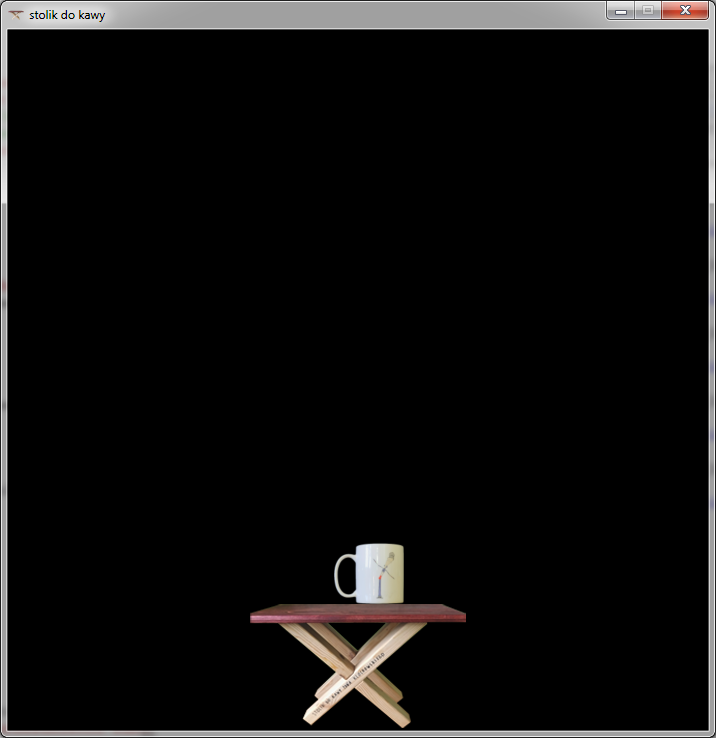
import pygame
import sys
pygame.init()
screen_game=pygame.display.set_mode((700,700))
ikonka=pygame.image.load("pliki/favicon.png")
pygame.display.set_icon(ikonka)
pygame.display.set_caption("stolik do kawy")
screen_rect=screen_game.get_rect()#tworzymy prostokat ekranu
limegreen = (50, 205, 50)
black = (0, 0, 0)
chocolate = (210, 105, 30)
white = (255, 255, 255)
x=50#poczatkowe polozenie kubka
y=50#poczatkowe polozenie kubka
x_stolika=screen_rect.centerx - 110#minus polowa dlugosci stolika
y_stolika=screen_rect.bottom - 126#minus wysokosc stolika
stolik_image = pygame.image.load("pliki/stolik_220x126.png")
kawa_image = pygame.image.load("pliki/pani_fral_70x70.png")
zegar=pygame.time.Clock()#ustawiamy zegar

while True:
    for event in pygame.event.get():
        if event.type == pygame.QUIT:
            pygame.quit()
            sys.exit()

    przycisk = pygame.key.get_pressed()#nacisniecie przycisku
    if przycisk[pygame.K_d] and x < screen_rect.width - 70:
        x=x+4
    if przycisk[pygame.K_a] and x > 0:
        x=x-4
    if przycisk[pygame.K_w] and y > 0:
        y=y-4
    if przycisk[pygame.K_s] and y < screen_rect.height - 70:
        y=y+4

    screen_game.fill(black)
    kawa = pygame.Rect(x,y,70,70)
    stolik = pygame.Rect(x_stolika,y_stolika,220,120)

    if kawa.colliderect(stolik):
        if przycisk[pygame.K_d]:
            x = 170
        if przycisk[pygame.K_a]:
            x = 460
        if przycisk[pygame.K_w]:
            pass
        if przycisk[pygame.K_s]:
            y = 504

    screen_game.blit(kawa_image, (x,y))
    screen_game.blit(stolik_image, (x_stolika,y_stolika))
    zegar.tick(60)#odswiezamy ekran po przesunieciu kubka
    pygame.display.update()
|
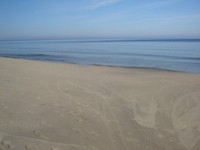 Kąty Rybackie - wieś w Polsce położona w województwie pomorskim, w powiecie nowodworskim,
w gminie Sztutowo na obszarze Żuław Wiślanych przy drodze wojewdzkiej nr 501.
Wieś jest siedzibą sołectwa, w którego skład wchodzi również miejscowość Skowronki.
W latach 1975-1998 miejscowość administracyjnie należała do województwa elblskiego.
Kąty Rybackie znajdują się na terenie Mierzei Wiślanej na zachodnim brzegu
Zalewu Wiślanego, w odległości 56 km od Gdańska, a 17 km od Krynicy Morskiej.
Jest to wieś rybacka z portem morskim i przystanią. Znajdują się tam szerokie,
piaszczyste plaże oraz rezerwat przyrody kormorana czarnego.
Rezerwat stanowi największą w Europie ostoję kormoranów. Zarówno sam rezerwat,
jak i atrakcyjne miejsce położenia nad Zalewem Wiślanym
dał podstawy do rozbudowania tu pokaźnej infrastruktury turystycznej
i uczynienia z miejscowości popularnego ośrodka turystyczno-wypoczynkowego.
Jest to również miejsce wycieczek młodzieży i nauczycieli VIII LO w Gdańsku.
Kąty Rybackie - wieś w Polsce położona w województwie pomorskim, w powiecie nowodworskim,
w gminie Sztutowo na obszarze Żuław Wiślanych przy drodze wojewdzkiej nr 501.
Wieś jest siedzibą sołectwa, w którego skład wchodzi również miejscowość Skowronki.
W latach 1975-1998 miejscowość administracyjnie należała do województwa elblskiego.
Kąty Rybackie znajdują się na terenie Mierzei Wiślanej na zachodnim brzegu
Zalewu Wiślanego, w odległości 56 km od Gdańska, a 17 km od Krynicy Morskiej.
Jest to wieś rybacka z portem morskim i przystanią. Znajdują się tam szerokie,
piaszczyste plaże oraz rezerwat przyrody kormorana czarnego.
Rezerwat stanowi największą w Europie ostoję kormoranów. Zarówno sam rezerwat,
jak i atrakcyjne miejsce położenia nad Zalewem Wiślanym
dał podstawy do rozbudowania tu pokaźnej infrastruktury turystycznej
i uczynienia z miejscowości popularnego ośrodka turystyczno-wypoczynkowego.
Jest to również miejsce wycieczek młodzieży i nauczycieli VIII LO w Gdańsku.